

Learn how to deploy a Streamlit-based LLM chatbot whose history is stored in Azure Managed Redis. Setup takes just five minutes, with built-in capabilities like per-user memory, TTL, token counts, and custom system instructions.
Features
-
Multiple users, each with their chat memory and settings
-
Running a live token count over the stored chat context
-
Ability to trim context to the last n messages
-
User-specific TTL for chat history entries
-
Configurable system instructions
Architecture
The demo app consists of three main Azure components working together to deliver a multi-user LLM chatbot with persistent memory:
-
Azure App Service hosts the Streamlit web app (LLMmemory.py). When a user submits a prompt, the app’s managed identity obtains an Azure AD token and forwards the request to Azure OpenAI.
-
Azure OpenAI Service (GPT-4o) processes each incoming chat request. The Streamlit app sends the most recent context (based on the “Length of chat history” setting) alongside a system prompt to the OpenAI endpoint, which returns the assistant’s response.
Azure Managed Redis stores every message—user prompts, AI replies, and system instructions—as Redis hashes under keys like mysession:<UserName>:<entry_id>. The redisvl library’s StandardSessionManager abstracts reads and writes, enabling features such as per-user chat history, TTL, and token counting.
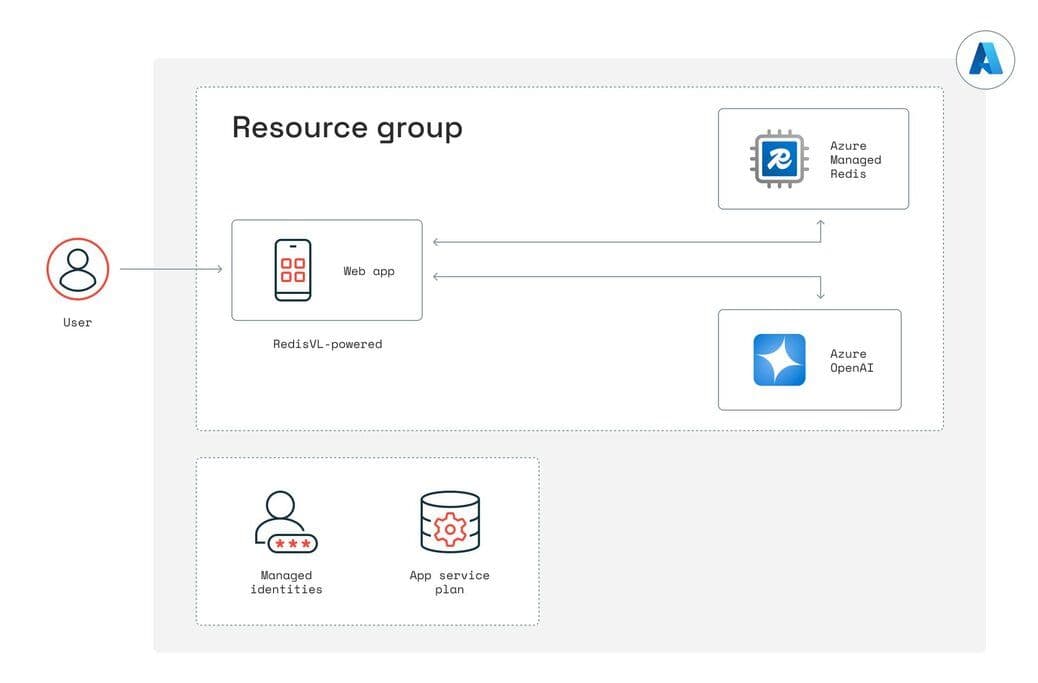
By using managed identities for both Redis and OpenAI, no secrets are required in the code or configuration. All resources are provisioned via Bicep in the infra/ folder, and the Azure Developer CLI (azd up) ties them together, creating the resource group, App Service, Azure Cognitive Services instance, and Redis cache in one seamless deployment.
Prerequisites
Azure Subscription
Azure CLI
Azure Developer CLI
Set up
Install/update Azure CLI
brew update
brew install azure-cli
Azure login
az login
This should open a new browser window or tab to authenticate into your Azure account.
Install Azure Developer CLI
brew install azure/azure-dev/azd
If you have trouble installing the Azure Developer CLI from above, try grabbing it from here
curl -fsSL https://aka.ms/install-azd.sh | bash
Verify the version
azd version
You should see azd version 1.x
Clone the demo repository and get into the folder
git clone [email protected]:robertopc1/Redis_LLMmemory.git
cd Redis_LLMmemory
Azure Development CLI login
azd auth login
If you’re not an Admin/Owner of the Azure account you’re using, then before you run the demo, make sure your Azure user has the Cognitive Services contributor role. If you still hit errors while running azd up, being assigned the owner of the resource group unblocks most errors. If you need to troubleshoot with various permissions, resource groups, etc., remember to run azd auth logout and then azd auth login to refresh your session in your terminal after making changes in Azure.
Run:
azd up
Most of the time, everything stands up by itself within five minutes. And you’ll get a URL endpoint to the app in the terminal that looks something like this:
Deploying services (azd deploy)
(✓) Done: Deploying service web
- Endpoint: https://web-fostjta2f5eww.azurewebsites.net/
Occasionally, it may time out while creating/updating resources:

Just rerun azd up, and it will finish creating the resources.
Feature walkthrough
Multiple users with their separate chat memories
By specifying a list of users and initializing a StandardSessionManager with a distinct session_tag per user, each person’s chat history is stored under keys like mysession:Luke:<id> versus mysession:Leia:<id>. Switching the “Select User” dropdown changes which Redis‐backed session is active.
Live token count of stored chat history
This function computes the total token count over the last n messages by encoding each message with tiktoken. The sidebar metric displays “Chat history tokens” in real time, helping you gauge prompt length versus model limits.
Trim context to last n messages
A sidebar slider lets you choose how many recent messages to send as context. During each LLM call, only the top contextwindow messages (excluding the system message) are retrieved, effectively pruning older history.
Per-user TTL (time-to-live) for chat entries
By selecting a TTL value and clicking “Set TTL,” the code grabs the most recent contextwindow entries for that user and calls redis_client.expire on each entry’s key. Those hashes will auto-expire after the chosen number of seconds.
Configurable system insstructions for LLM behavior
A dropdown offers three presets—“Standard ChatGPT,” “Extremely Brief,” and “Obnoxious American.” When changed, update_system_instructions finds the user’s system message in Redis (the very first entry) and overwrites its content field via hset. The next LLM call uses that updated system prompt.
Clean up
When you’re ready to shut down the app, remember to tear down your resources:
azd down